Monday, April 13, 2009

Thing 23-Success


Wow! I've learned a lot...and completed the survey!
Yay me!

Thing 22--I can't believe I did the whole thing...almost!

You have to be my age at least to get the commercial reference to the title. I really can't believe I have come so far with these things. I had a slow start and a lot of frustrating moments in doing these things, but I'm glad I persevered. I definitely learned a lot and I hope the NEFLIN site stays up for awhile because I would love to refer to it for some of the tools.

I have found that while I am not a writer, I'm not witty, clever or creative and I don't really like to write. Blogging is pretty easy, especially if you don't think anyone is reading. I don't know if I will keep up this blog, but I will miss it to a certain extent. I have offered to keep up a blog for my department on the new website and I hope to introduce some of these tools to the public at large. Thing 20 had so much information that I will have to go back and look at that thing again because I think those tools will be interesting to patrons.

I would love to keep learning about new web tools and one of the ways I think I can do that is just by talking to colleagues.

Thanks for the project and the fun!

Thing 21--Student tools

The idea of this thing is good, but the reality is pretty humorous. Most students only think about their assignment a few days before it is due. We've all been at the reference desk and has students tell us that their 10 page paper is due tomorrow. My 10 year old is not there yet since in elementary school there is very little homework, but she is generally interested in school work and likes to get started early.

I looked at the Assignment Calculator and thought that the steps laid out by the program seemed useful if you give yourself enough time to do the assignment. As a librarian in the public library, I can see myself suggesting this to patrons who are working on a project. I don't know if would work for library projects, since they don't fit into the subject categories, but since the guidelines are very broad and general, it could be useful.

The Research Calculator is interesting. After listing the assignment dates, this tool gives you questions to contemplate as you work on your project. It teaches students to think about their project. I liked this one and I think it could be used for library projects.

The uses of these tools are limited, but still have value.

The Book Thing--#20

OK, I tried to read the article about "the future of the book," and I found a blog with all sorts of information, but none of it was really discussing the future of the book.
As Librarians, we have been discussing this topic for a long time. I remember the issue coming up in graduate school, 15 years ago when the internet was just becoming a known tool. We had email and Netscape, file sharing and listservs. It was all very mind blowing at the time. I remember the discussions about how academic journals were becoming irrelevant because, by the time the information was published, it was already old new.
I do see the dissolution of print when it comes to magazines and periodicals. It seems that we get a notice each week of defunct magazines and struggling newspapers. There are more and more e-journals and news blogs and we can read whole issues of magazines online.

I read the article about "Literacy Debate: R U Reading," and yes I can see the concern, but reading online is also reading. It's just blips of reading instead of long reading. Current society is perfect for people with A.D.D, because we are constantly moving our attention from one subject to another.
On with the things... I looked at the following sites:

Twitterlit-this was cute. I enjoyed reading the ticklers or first lines from the books, but I couldn't get further into the book. I guess I needed to sign up for an account and I didn't.

Dailylit-this was interesting and I did sign-up for an account. It seems to be promoting group reading. I wanted to read the book about western art, but I also realized that I would miss out on the images by reading the text. I'll have to see when I validate my account.

BooksinMyPhone-I won't be reading books in my phone because my phone is too small and I don't access the internet via my phone, even though it has the capability to do so--too expensive to add that feature. But while looking at the books listed, they seemed like old classics with free copyright, many of which I've read in my life, or that I'm not interested in reading.

Reading Trails seemed interesting and similar to Library Thing.

Booklamp did not interest me, so I really didn't go to far into it. I'm more more exploratory of a reader and like to read around.

I loved, What Should I Read Next! I typed in the title of a book I recently read and liked and I loved it that 10 suggestions came up immediately, several of which I had already read.

I've seen the What Next? DB before and it can be very useful. Now I see that Kent District Library has added a link to their catalog for the books and that's great for them, perhaps confusing for our patrons. This is a good service and can be done pretty easily in this database.

I didn't find Readerville very interesting because it's a forum about reading and a lot about writing. Since I'm not interested in writing...

Living Social is just a bunch of personal book reviews.

LitLovers seems like an excellent resource to connect to local book groups. I loved the reader's guides. They are comprehensive with lots of interesting information about the authors as well as discussion questions for the group. This is an excellent resource.

OK I'm getting overloaded...there's too much out there, I don't care anymore.

It's obvious that people like to connect around books and reading. It's a way of sharing ideas. It's more obvious that people want to give their opinion about what they are reading. What I see in the library however, is people wanting to connect with other people in person. I think all these online communities perpetuate isolation rather than help it!

Sunday, April 12, 2009

Thing 19-Other Social Networks

It's interesting to see all the places that people go to try and connect online through various social networks. The first social network that I signed up for many years ago was called Friendster. I just looked it up and it still exists and my account from 8 years ago is still active. Whodathunk!@#$? I never got very involved with it, because I felt kind of foolish sending out friend requests to total strangers. It also felt unsafe and vulnerable.
Webjunction is a network that I'm familiar with. I got an email from them once and signed up to get the newsletter. I get a newsletter from them quarterly, or monthly, I'm not sure. They sometimes have useful information, so professionally, I like this social networking site, although I have not utilized it fully.
I tried out Ning and I think the concept is interesting. I looked up a variety of potential social network groups including, Peace Corps, Families with Children from China, Nepal and Parenting Teens. I found some interesting sounding groups, but I could not explore most of them because I needed an invitation to visit or I needed an account--I'm not ready to sign up for a new account. I did peruse the "Nepal" group, since it was completely open and it looked like Facebook. Members loading photos, sending comments to eachother etc. The idea is good and maybe I'll want to join a group sometime, but I didn't find anything too compelling tonight. My life is too full right now to join another anything.
I perused Gather and it once again seemed like Facebook. I couldn't quite see how it was different from the others. I read through the profile of one of the highlighted users and it seemed very personal. I didn't see the conversation.
Social networking has some benefits, but mostly for folks who want to connect virtually rather than in person. I guess the virtual connection may eventually lead to a personal connection...but I don't know yet.

Wednesday, April 1, 2009

Thing 18--Facebook

Hurray! Another easy THING. I already am a member of Facebook and have been for several months, so this one was easy.

I have investigated both My Space and Facebook for work because as librarians we are always trying to find ways to outreach to different parts of the community. We created a My Space account for the Adult Services department a couple of years ago. We had an Intern from Ansan College in Korea and he did most of the layout work, we provided the content. The Alachua County Library District also has a nice My Space page, as do many other libraries.

I joined Facebook because old friends from the Peace Corps sent me invitations to join. At first I didn't see the point, but because I wanted to see what they were up to, I signed up for an account. Slowly but surely, I started adding profile information, pictures and looking at what my friends around the country/world are doing. Facebook can really drain your time. It took me several frustrating days to figure out how to load pictures, but then when I knew I was happy to have them up. Now they look out of date!
The group I signed up for most recently was FLA. I recently renewed my FLA memebership and while doing so a box came up with places that I could show-off my membership. So I signed into my account and now it's listed on my Facebook page.
This is another way that I see how these "THINGS" connect to other things.
Pretty cool!

Podcasting-Thing 17

This was fun and exciting and it gave me a chance to see how some tools build on eachother. I'm a big NPR fan, and I know that they have all kinds of podcasts, so I went to NPR site to see what podcasts I could add to either my Bloglines account or somewhere. NPR makes it very easy to sign up for podcasts, they actually have a podcast button on their homepage. From there they listed all their programs and I found a couple of programs that I enjoy listening to "Whad'ya know" and "Wait, Wait Don't Tell Me." Both are very humorous and when I can get good reception in my car I laugh my head off!
The best part is that NPR makes it so easy to download the podcast if you have a My Yahoo account. Well, I just happen to have a My Yahoo account! So I opened it up in a different IE tab and click, download to My Yahoo, and there it appeared. It asked if I wanted to keep the new additions to the page, I clicked OK and now I have a whole bunch of episodes from my favorite shows that I can listen to. Woo hoo!
I have to say that I tried figuring out how to add podcasts to my Bloglines account and I couldn't, so I'm glad NPR made it so easy.
I hope the rest of the things are this easy!

Thing 16--YouTube


I am so excited that I found this video. I originally saw it in a NEFLIN class about Library 2.0 and I was pretty blown away by some of the concepts in the video. I had searched in YouTube before under the title "Mind Blowing" but didn't find it. Tonight I searched under "technology" and found a very sexy video with 5 cents and Justin Timberlake, that didn't seem to have anything to do with technology...and I found some others. Finally I searched under "Information Overload" and I found the video and embedded it into the blog. I feel so cool right now!

Thing 16 Rocks!

Thing 15-Rolling

I was not really impressed with Rollyo. I clicked on the listed Rollyo sites for searching for quotes and searching for public domain books and I was not impressed with the results. First of all on the results page, it brought up a Google search box front and center. I looked at some of the suggestions for quotes on "family" as an example and many of the sites were not relevant to quotations at all. Google seems just as efficient with more relevant results. I guess with Rollyo you don't need to type in as many words.
I went to the Rollyo site and tried to do a search on "China Travel." The results were all over the map. I had done a similar search in Google and found the results to be much more relevant and useful.
I don't know how or when I would use this tool because the searches are less relevant than Google in my opinion.
I created my own search roll featuring "Cheap Air Fare" and of course I looked the topic up in Google to get ideas for the sites to add into the rolled search. What I found was that my Google search was just as, if not more relevant the Rollyo search. Hmmm, I'm not really seeing the advantages with this one, but at least I know about it!
I'm going to try to add the search box to my blog, but I'm not usually too successful with some of the add ons. I'll see what happens. Hopefully it won't make me!@#$%&*

Monday, March 30, 2009

Thing 14-Tools?!@#$%

For a start page I tried out both iGoogle and My Yahoo. I seem to prefer MyYahoo, maybe because that is my main personal email account and I visit that site often enough to see the information on that page. I also like the page design/template choices on My Yahoo more than I liked the iGoogle options. I chose the "forest" template.
I think some of these tools are useful and great for those who don't have a home or work computer. I find that my cell phone is the best place for me to keep my appointments because it will ring and remind me. Otherwise I must remember to log into My Yahoo to see what's going on in my life. At work I use my Microsoft Outlook calendar to keep track of my life and I like that. I can see the appeal of the Blackberry, so that people have access to email and all this info in the palm of their hand.
Once again I tried to insert the countdown clock. It said to insert the html code into the blog profile. I'm not sure where that is so I'm not having any success with this. If I have time at work, I will ask someone for help with this. Otherwise, you'll have to read my comments on my attempts which seem to fail most of the time.
Created by OnePlusYou


OMG I can't believe it worked!!!

Library Thing 13

I had fun with this tool. I actually joined Library Thing in January because I had heard of it and decided to check it out. I added books in January and today, I created a profile, added a few more books, uploaded a picture and explored some of the other options in the site. Some of the books I've read are very popular of course, like Water for Elephants, and other not so well known, like, The Last Chinese Chef. I liked seeing the recommendations list of books I might like. I think I will read some, many I had already read, but had not yet put them on my list. I tried to post a random display of my books to my blog, but I can't figure it out to save my life. I've checked into the "add widgets" area and I also copied the code from Library Thing and tried to post it into both the "image" and "video" upload options to no avail. This is where I need some help.

Is there anybody out there to help me with this or is no one reading this blog at all!

Here's a link to my Library Thing page anyway.

Friday, March 27, 2009

Thing 12--wikis

I have been using wikis, a little bit, for awhile. Of course my favorite wiki is wikipedia, and as much as library folk like to badmouth it, I love wikipedia and use it. Granted, it's not an authoritative source, but it's useful, it's clean, it's well organized and it's easily searchable. This is more than I can say for most wikis that I have encountered.
I'm not very keen on wikis as a library tool because they are not easy to edit or add to. They seem pretty convoluted actually. My first experience with a wiki was with the SSLLI wiki and I added a short bio to it, but I found it difficult to navigate or maneuver, so I never used it. I'm also part of an e-Government wiki and once again, I don't find it very user friendly, I can't usually find the information that I'm looking for. Another wiki that I have recently gotten involved with in the ACLD storytime wiki created by a Librarian in Youth Services. This is the one that I chose to add content to. I typed up a couple of favorite old fingerplays for the wiki, but when I wanted to edit the title or delete it, I couldn't figure out how. So here is the link to the content I created is listed twice because when trying to edit it I create another entry...I gave up after that. Frustrating! You can see it at the link and it's called "Old ideas for programs."
OK, wikis are not my thing, but I did it.

Thursday, March 12, 2009

Thing 11-Social Media

There is an aspect of social media that reminds me of reading the National Enquirer or Time magazine in the checkout line of the grocery store. I know it is actually very different...I did watch the the Common Craft video. Once again, I realize that even though I spend most of my day every day in front of a computer, I am not an internet junkie. I think it's because I don't want to spend so much time sitting. I like to and have to be moving after I leave work. Some things, such as podcasts, allow you to move while using a technology, but reading is not one of them.
So I checked out Mixx and read the headlines under "News" and "Popular." I also read the paper this morning and read some of the same info, but the "News" link on Mixx has a more international flavor than our local newspaper. I also looked at Digg and I noticed that both sites have a similar organization to them. They let the reader know how recent the news post is, how popular it is (by number of hits) and they have categories that you can click onto to sort your news by your preference.
This would definitely be a handy tool for those interested in pop culture and the uncensored nature of it is interesting.
I can see using this at the reference desk if I get a question about latest news about something, but it would still be a lot of reading to sort and find what I'm looking for. Social Media are interesting tools and I'll have to think longer on how I can use this in my work or personal life. I guess now I don't have to go to the grocery store to read the cover of National Enquirer, I can find it under the "Popular" tab on a social media site.

Wednesday, March 11, 2009

Thing 10-del.ici.ous


Social bookmarking is a great idea, especially for those who like to save a lot of sites as favorites. I'm going to have to get Alan to sign up for this since his "favorites" list is long and hard to sort through. For me, I realize, once again that I'm not the computer/internet junky that I have the potential to be. I realize I don't play on the internet, I use it as a tool only.
I signed up for my del.ici.ous account and when it asked to import my current bookmarks, I quickly looked through my list of favorites to see what I had saved. The results: one site on "4th grade math problems." The rest were a list supplied by my IE browser which mostly consisted of sites that I, or those I share a home computer with, have frequently visited. YouTube is one of the sites, since my daughter loves that site another was a bank site since Alan does online banking (I don't).
Since I don't have any favorites, I did some del.ici.ous searches. I looked up "23 Things" and found a lot of blogs from libraries around the country. I searched under "travel." This brought up sites for cheap airfare as well as travel blogs that people have posted. I searched under "cheap cruises" and found lots of sites advertising cheap cruises.
I can see the uses of this. In a way it's better than Google, since there sites have a "recommended" quality to them since someone has bookmarked them as "a keeper."
What a yummy learning experience, definitely del.ici.ous.

Saturday, March 7, 2009

Thing 9

OK. Sometimes these 23 Things make me feel homocidal. I think I'm going to kill the internet. I don't know why they don't work for me, but I think I have some sort of virus that prevents my brain from easily understanding how to upload this stuff onto my blog. The creating is fine. The uploading is the confusing part. Is a slideshow from Zoho an image or a video. It's all so messy. And if it takes more than 30-45 minutes for me to figure something out. I would rather kill it than do it.
Here is a slideshow I created for National Library Week last year. Since I can't upload it I'm enclosing the link. We'll see if it works.
I have created multiple slide shows in Powerpoint and more personal ones on a free site www.slide.com. Zoho and Slideshare seem to be free options for creating slideshows if you don't own a computer or your computer doesn't have the MS word office package. I know this is all expensive. But since I do have Powerpoint I'm not really inclined to put slideshows on the internet. But for patrons, I can see it is an excellent option. I could direct students to this if they must create a presentation for class. Then they don't have to save the presentaion onto a CD or thumbdrive. I have however tried out the photo sharing slideshow at the above link and had fun with it.
Later, I will see if I can get one of my Library powerpoints to load.
Sayonara

Friday, March 6, 2009

Thing 8


Instant messaging is an interesting concept. Instant access to everything we want is very much part of our culture now. Do you remember life before cell phones? We just understood that you had to leave messages and that folks would get back to us. We even wrote letters sometimes. Email was considered an amazing way to communicate and FREE. Now our ability to connect with others has increased exponentially.
I haven't done much IMing, perhaps because none of my friends really uses it much. I guess I'm more of the generation of, "why not pick up the phone and call?" I speak better than I type and I'm a pretty good typist. Or why not just email? It's pretty fast. I'm trying to think of the applications that this would be useful and I guess Gamers love IM.
I use text messaging all the time. I use it because my friends and daughter use it, but I have many friends that don't use it. I find that texting is a better way of communicating with my babysitter than leaving a message because she won't necessarily listen to her messages--too many steps. Text messages you can read instantly.
At work we have been responding to email questions for over a decade and it works well. It's also pretty quick to turn it around if they email during open hours. All librarians participate in Ask-a-Librarian online chatting. This is fun and sometimes challenging but a great idea.
Ths r my thghts. C U L8TR.

Tuesday, March 3, 2009

Thing 7--Eureka!


My creation
Originally uploaded by Be Astengo
Is this working? OMG I figured it out! I posted from my Flickr account. Wow. I'm not sure how to use this for work, but I can think of ways of using this personnally, but that's only if I keep up a blog. I have some more exploring to do with this one.

Thing 7

I can't figure this one out. I need help! I made posters and puzzles and the only way I can figure out how to load the image is by saving it first onto the desktop, then upload it to blogger. That's how I did the spelling, which was no small feat! Creating is fun, but posting it to the blog is annoying as heck.

spelling be


Thing 6


This is a creative activity if you have nothing to do. I can see it being fun for kids if they are so inclined. I created a jigsaw of myself since that seems playful, but I couldn't move the pieces, so not as playful as I would like.

Thing 5 part 2

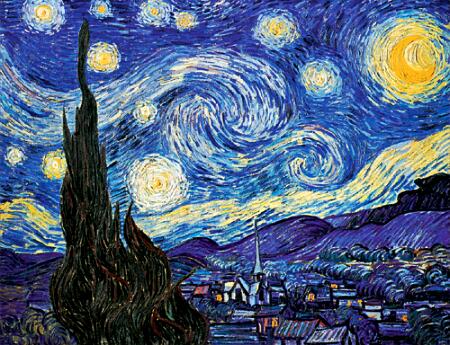
For the image below I did a Google image search, but since this thing is about Flickr, I went onto Flickr to look for images/photos that would match my original search of "starry night." I found some beautiful and interesting images, and of course the Van Gogh image also. It's interesting to see what a variety of images people use under the tag of "starry night."
I have also tried out other photo sharing sights such as Picassa, since it's free and it's Google. I've also used Snapfish and Kodakshare. A friend of mine recently sent me some gorgeous photos of my daughter and her friend climbing trees and she shared them through Facebook and Picassa. The ability to share photos so easily is really delightful once you organize the photos. For me, there are complications in organizing digital photos that I can't begin to go into. It may just be part of the fact that I'm neither a neat nor an organized person and I share a computer with 2 other people at home. It can be confusing.
I tried to add 3 images from Flickr that used the tag "starry night" but it didn't work the way the image below did, so I'm not sure what's up. Instead, click the "starry night" link here and you can see all of them. Weird how technology doesn't always work the same way from day to day.

Monday, March 2, 2009

Thing 5

Here is an image I copied from somewhere on the internet. It's a well known image that I appreciate. I visited the Van Gogh Museum in Amsterdam about 25 years ago and loved it. My daughter drew a rendition in of this, in 2nd grade, which hangs on my office wall.
Photo sharing is really pretty great. I love how easy it is to find images and upload them onto documents or webpages. I also love how I can take 100 photos on the digital camera while on vacation and only print out the ones that I like. The difficult part is keeping track of all the photos and where they are on my computer.

Friday, February 20, 2009

Thing 4...RSS and Newsreaders

Sometimes I think that in spite of my seeming sophistication and frequent use of computers, I'm still an infant when it comes to all these new technologies. I watched the video from Common Craft Show. This is a great site for folks like me, it broke down the concept of RSS feeds and Newsreaders in really simple terms.

The problem comes when I try to think of my favorite websites. I sit in front of a computer all day, answer emails (this has become the main venue for giving and receiving work), look up information for patrons, type reports, but I don't really have any favorite websites. My daughter loves to watch YouTube and she is constantly looking up songs to watch and listen to, but I'm still in the real world more than the virtual world.

OK so this is a fun experiment. I signed up with Bloglines and added a few subscriptions to news, music and a few other irreverent sites. Now, I'll see if I use it.

That's enough fun for one day.

Thing 3...searching the blogosphere

I love all the new vocabulary that the internet has brought about. I remember hearing about weblogs maybe 10 years ago. Many started as political rants. Weblogs turned to blogs and now we have a "blogosphere." It's right up there with atmosphere and hemisphere and connotes something really big. I first heard the term "blogosphere" a year ago from my friend's 25 year old, New Yorker niece, (very hip) and she was always searching for election gossip, especially Obama info since she was a big supporter. She told me about the Huffington Post , which I had never heard of previously. I checked it out and found it was like reading a newspaper editorial. I realize, especially now that I am writing a blog, that the blogosphere is universe of editorials. Some interesting (especially if they agree with your opinion) some boring.

I searched Technorati, Blog Pulse and Blog Lines (notice the hyperlinks!). Technorati has the best reputation it seems or is the mostly widely known. I did the same search on all three search engines . The search was "library budget cuts" in quotation marks and Technorati gave me 2 results that we 90 and 97 days old. I got better results in Blog Pulse and Blog Lines which delivered many of the same articles.

It's all very interesting and I keep thinking about that video that said something like we are bombarded with more information in 24 hours than most people 100 years ago got in a lifetime. I think, do I want this much information? Is this what I want to be doing with my time.

I'm doing it for 23 Things, so that I'm informed, but really I'd rather be outside.

Thursday, January 15, 2009

Thing 2

I've read a lot about Library 2.0, Web 2.0 and attended workshops about it. All these tools are amazing and fun, but they suck your time. The online world will keep you up 'til the wee hours. I need my sleep...

Another observation is that all these 2.0 technologies are about exposing yourself. It's weird. I realize I'm dating myself by saying I feel self-conscious about posting personal information, music tastes, pictures of myself or my family or revealings my interests and hobbies. To me it's TMI. I don't necessarily want that much information about other people either. But I'm doing it because everyone is encouraging me too. It still makes me nervous. Would I do this if I wasn't a librarian?

Yet I love the internet! I think it is truly magic! And I'm sorta glad so much stuff is available.

Recently, I got a call from a cousin (we have the same great-grandfather) and he was telling me about our genealogy. He did all the genealogy research for our English ancestors from his computer in Washington State, searching census, marriage and military records in England online. All this is absolutely amazing.

Thing 1

Setting up a blog was easier than pie. The biggest challenge will be remembering the username and password for all these things. I chose the dark blue dot template because it seems playful, albeit a bit dark for my taste. Anyway, the adventure has begun and so far I haven't had to walk uphill. I better knock on wood so I don't jinx myself.
Adios amigos.